SQL Server – Non-clustered index seek is better than Clustered index seek
I was working on removing duplicate indexes from a table. Before removing an index usually I check whether that index is used by any query or not, is there any index hint is used, looking at index usage statistics and many other factors.
If you search in web you will get many ways to identify duplicate indexes and to remove them. I refer http://www.sqlskills.com/BLOGS/KIMBERLY/post/RemovingDuplicateIndexes.aspx to identify duplicate index.
So Here I’m not going to tell, how to find duplicate indexes. Here I’ll reveal a scenario where non-clustered index seek is better than clustered index seek and how you can find the reason for this?
Demo:
Create a database
Create Database SQLCommitted
Go
Create a table where Key1, Key2, Key3 is the primary key
CREATE TABLE [dbo].[MyTable](
    [Key1] [char](4) NOT NULL,
    [Key2] [int] NOT NULL,
    [id] [int] NULL,
    [Key3] [bit] NOT NULL,
    [DeleteIndicator] [bit] NULL,
    [createdby] [varchar](50) NOT NULL,
    [createtimestamp] [datetime] NOT NULL,
    [modifiedby] [varchar](50) NOT NULL,
    [modifytimestamp] [datetime] NOT NULL
 CONSTRAINT [pk_MyTableIndex] PRIMARY KEY CLUSTERED
(
    [Key1] ASC,
    [Key2] ASC,
    [Key3] ASC
)WITH (PAD_INDEX  = OFF, STATISTICS_NORECOMPUTE  = OFF, IGNORE_DUP_KEY = OFF,
 ALLOW_ROW_LOCKS  = ON, ALLOW_PAGE_LOCKS  = ON, FILLFACTOR = 80) ON [PRIMARY]
) ON
Create a non-clustered index on column Key1, Key2, Key3
CREATE NONCLUSTERED INDEX [INDX_Key1_Key2_Key3] ON [dbo].[MyTable]
(
    [Key1] ASC,
    [Key2] ASC,
    [Key3] ASC
)WITH (PAD_INDEX  = OFF, STATISTICS_NORECOMPUTE  = OFF,
SORT_IN_TEMPDB = OFF, IGNORE_DUP_KEY = OFF, DROP_EXISTING = OFF, ONLINE = OFF,
ALLOW_ROW_LOCKS  = ON, ALLOW_PAGE_LOCKS  = ON, FILLFACTOR = 80) ON [PRIMARY]
GO
Now we have two indexes one is clustered and one is non-clustered and both are created on same columns.
Below query will return all index detail created on table MyTable.
select * from sys.indexes where object_id = OBJECT_ID('MyTable')
Below result showing there are two indexes on table ‘MyTable’

Lets populate some records in table MyTable
Create Table Numbers(num int identity )
Go

Insert  Numbers default values
go 10000

INSERT INTO [MyTable]
([Key1] ,
[Key2] ,
[id] ,
[Key3],
[DeleteIndicator] ,
[createdby]  ,
[createtimestamp],
[modifiedby] ,
[modifytimestamp])

SELECT top 700 'ABCD', num,NULL,0,0,'SQLCommitted',GETDATE(),'SQLCommitted',GETDATE()
FROM Numbers

INSERT INTO [MyTable]
([Key1] ,
[Key2] ,
[id] ,
[Key3],
[DeleteIndicator] ,
[createdby]  ,
[createtimestamp],
[modifiedby] ,
[modifytimestamp])

SELECT top 300 'DEFG', num,NULL,0,0,'SQLCommitted',GETDATE(),'SQLCommitted',GETDATE()
FROM Numbers
Now Include Actual Execution Plan by pressing Ctrl+M key or by selecting from Query menu and execute the below query.
SELECT key1 FROM MyTable WHERE Key1='ABCD'
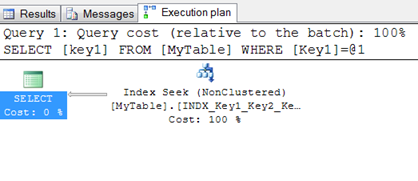
For the above query, optimizer chooses non-clustered index seek over clustered index seek.
At this stage I feel why didn’t it use clustered Index seek? As the Colum and predicate both is part of clustered index key. To know why optimizer use Non Clustered Index seek over Clustered index seek I compare existing query with same query applying clustered index key hint.
SELECT key1 FROM MyTable WHERE Key1='ABCD'

SELECT key1 FROM MyTable WITH (INDEX([pk_MyTable])) WHERE Key1='ABCD'
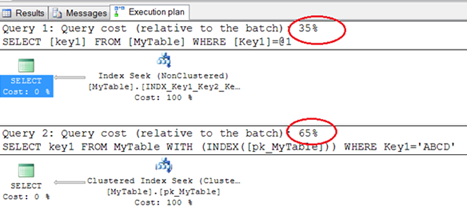
The execution cost is more if it use clustered index seek so it use non clustered index seek over clustered index seek.
Why Clustered index seek is more costly?
To know the reason I compare both operator details and found in case of clustered index seek the Estimated I/O cost is more.
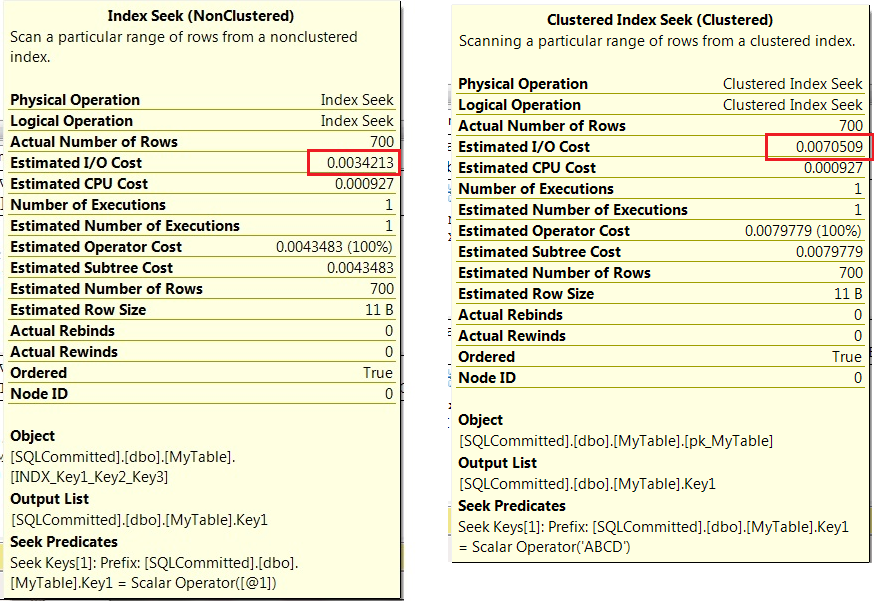
Why Estimated I/O is more in case of clustered index seek?
To answer to this question let’s collect statistics IO for both the queries. See below the logical reads is more in case of clustered index seek i.e.8 logical reads where as non clustered index has only 3 logical reads.
SELECT key1 FROM MyTable WHERE Key1='ABCD'

SELECT key1 FROM MyTable WITH (INDEX([pk_MyTable])) WHERE Key1='ABCD'

Why Logical reads is more in case of clustered index seek?
It happened because in clustered index, the leaf level stored actual data row and non-clustered index contain only index key at leaf level and Clustered index row size at leaf level is greater in size as compared to non-clustered index row at leaf level. In result non-clustered index leaf level can accommodate more rows per data page.
In our query we are fetching column key1 which is part of index key for both clustered index and non-clustered index but here the optimizer choose non-clustered index seek because it look in to less number of pages.
How to find number of pages used by an index?
First find out index id of your index.
select index_id,name,type_desc from sys.indexes where object_id=OBJECT_ID('MyTable')
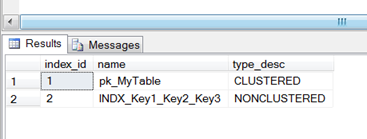
Pass index id to function sys.dm_db_index_physical_stats to fetch all index details.
Here we’ll find details for index_id 1 and 2.
SELECT
    index_id,
    index_type_desc,
    page_count,
    record_count,
    index_depth,
    index_level,
    record_count,
    min_record_size_in_bytes,
    max_record_size_in_bytes,
    avg_record_size_in_bytes
FROM
    sys.dm_db_index_physical_stats(DB_ID(), OBJECT_ID('dbo.MyTable'), 1, NULL,  'DETAILED')
UNION ALL
SELECT
    index_id,
    index_type_desc,
    page_count,
    record_count,
    index_depth,
    index_level,
    record_count,
    min_record_size_in_bytes,
    max_record_size_in_bytes,
    avg_record_size_in_bytes
FROM
    sys.dm_db_index_physical_stats(DB_ID(), OBJECT_ID('dbo.MyTable'), 2, NULL,  'DETAILED')

We can see here in case of clustered index for 1000 records it required 9 pages as the record size is 67 bytes whereas the same 1000 records required only 2 pages in case of non-clustered index.
Below we can see both index seems duplicate but they are not duplicate because columns_in_leaf are different.
Use procedure from http://www.sqlskills.com to get the below details.
exec sp_SQLskills_SQL2008_finddupes_helpindex 'MyTable'

Conclusion:
Pinal Dave said, Don’t guess or don’t think, why it happened or what will happen to a query when a query is submitted to query engine ask SQL server, it will tell you everything.
About
 Sandip Pani is a MSBI/SQL Developer. He holds a Masters of Computer Application degree from IGIT, Sarang, Odisha, India and a number of certifications such as MCTS, MCITP. He has been working with SQL Server over 7 years and specializes in SQL Server for application development and performance and query tuning. He has passion to contribute to MS-SQL Server community so he is committed to SQL. He loves to share and enhance his knowledge of SQL Server by spend time at newsgroups and forums, reading and writing blogs
You can contact me at s4sql@sqlcommitted.com

 SQLcommitted
-
Archives
- January 2014 (1)
- December 2013 (3)
- August 2013 (1)
- March 2013 (1)
- January 2013 (3)
- December 2012 (2)
- November 2012 (1)
- August 2012 (4)
- July 2012 (2)
- June 2012 (2)
- May 2012 (1)
- April 2012 (5)
-
Categories
-
RSS
Entries RSS
Comments RSS
 SQLcommitted